
CVS Specialty Login Issues: 2026 Fix-It Guide
Introduction: It’s Not You, CVS Specialty’s Login Is Genuinely Confusing
A patient sits down to check on a specialty refill, types in a familiar email and password, and gets rejected. A quick search produces conflicting advice: one result points to CVS Caremark, another to the CVS Pharmacy app, a third to a complaint board full of frustrated users. Twenty minutes later, the refill status is still a mystery.
This experience is common, and it has a clear cause. CVS’s official sign-in page offers almost no troubleshooting depth, while review sites vent about problems without explaining why they happen. The core issue is structural: CVS Specialty, CVS Caremark, and CVS.com are three separate login systems with separate credentials, not one unified account.
This guide decodes the sign-in hub structure, explains the password and lockout rules precisely, identifies the right support line for each problem, and shows what a lower-friction portal looks like for patients who need custom formulations. It is written for existing and prospective CVS Specialty patients, caregivers, and providers who keep running into authentication errors.
Why the CVS Specialty Login Feels Broken: Three Systems, One Brand
The CVS name covers at least three distinct digital account systems, and they do not share credentials. Employer benefit FAQs that explain CVS plans state it plainly: “Caremark is for Mail, CVS is a Retail App, and CVS Specialty is for Specialty Rx’s.”
The practical consequence is significant. A password reset on CVS.com does nothing for a CVS Specialty account, and a CVS Specialty reset does nothing for Caremark. Many patients who believe their account is broken are simply signing in to the wrong system.
CVS Specialty vs. CVS Caremark vs. CVS.com: What Each One Actually Does
- CVS Specialty: The dedicated portal for specialty, high-cost biologic, and infusion medications. It handles CareTeam messaging and specialty order tracking.
- CVS Caremark: The pharmacy benefit manager (PBM) system that manages mail-order prescriptions and plan benefits. It requires a completely separate login from CVS Specialty.
- CVS.com / Retail App: The consumer retail pharmacy experience for in-store pickup. It is unrelated to specialty or mail-order accounts.
Practical takeaway: Patients should identify which type of prescription they are managing before choosing a login. The wrong portal will not even recognize the prescription.
Decoding the Official Sign-In Hub (cvsspecialty.com/sign-in.html)
The official sign-in hub at cvsspecialty.com/sign-in.html does not lead directly to a single login form. Instead, it presents a “select a way to sign in” page that branches into multiple options, and those options are not explained in much detail.
The three branches are:
- CVS Specialty patient sign-in for standard specialty medication patients
- Coram patient portal, accessed through CVS Health MyChart
- Provider, payor, and pharma portals for prescribers, insurers, and manufacturers
Because the page does not clarify up front who belongs in each path, the branching structure itself becomes a major source of confusion.
Patient Sign-In vs. Coram/MyChart Portal
Coram is CVS’s home infusion division. Coram patients are routed through CVS Health MyChart rather than the standard CVS Specialty patient login.
Patients can usually tell which group they belong to by the type of care they receive:
- Coram patients typically receive home infusion therapy or enteral nutrition, often with nursing support at home.
- Standard specialty patients receive specialty medications (such as injectables or oral specialty drugs) shipped from a CVS Specialty pharmacy.
Choosing the wrong portal here is one of the most common reasons patients end up calling support. Anyone unsure should check their delivery paperwork or ask their care coordinator which system manages their therapy.
Provider, Payor, and Pharma Portals: Not for Patients
CVS Specialty Central is the prescriber-facing dashboard, entirely separate from patient accounts. CVS reports more than 40,000 monthly logins to Specialty Central from prescribers tracking referrals and patient status.
Providers should note one rule in particular: Specialty Central accounts auto-deactivate after 30 days of inactivity. Offices that log in only occasionally may find their account locked, requiring re-registration or a call to support.
The payor and pharma portals exist for insurers and drug manufacturers, not individual patients. Patients who click these options by mistake will not find their prescriptions there.
Before You Can Even Register: The Prerequisite Patients Miss
Many “I can’t even sign up” complaints share a single cause. Patients must first be transitioned to CVS Specialty by their insurer or provider before online registration is possible. There is no self-serve account creation without an active specialty prescription on file.
Before troubleshooting passwords or browsers, patients should confirm with their insurer or prescriber that the specialty transition has actually been completed. If the prescription has not yet reached CVS Specialty, no amount of login troubleshooting will create an account.
The Password Rules Nobody Explains: CVS Specialty’s Strict Policy
CVS Specialty enforces a password policy stricter than most consumer websites. Passwords must:
- Be 12 to 25 characters long
- Include at least one uppercase letter, lowercase letter, number, and special character
- Contain no more than 2 repeating or sequential characters (so “aaa,” “123,” or “abc” will fail)
- Not match any of the last 15 passwords used on the account
- Be reset every 90 days
The repeating and sequential rule trips up many people, since common habits like ending a password with “123” or “!!!” are rejected. The 15-password reuse restriction means users cannot cycle between two or three favorites.
The mandatory 90-day reset explains a frequent mystery: an account that suddenly stops working even though the password “should” still be correct. In many cases, the password has simply expired.
Step-by-Step: Resetting Your Password Correctly
The reset process requires several identity fields:
- CCA User ID or Client Login ID
- Email address on file
- First name
- Last name
Common failure points include:
- Mismatched name formatting, such as using a nickname, omitting a hyphen, or entering a middle initial that was not used at registration
- An outdated email address that no longer matches the account record
- Confusing the CCA ID with a Caremark ID, which belongs to a different system entirely
The best approach is to gather all identity fields before starting the reset flow. Locating paperwork or old emails beforehand reduces the risk of repeated failed attempts that can trigger a lockout.
What Happens When You’re Locked Out
Typical lockout triggers include:
- An expired 90-day password
- Too many failed login attempts
- An “unknown error” message during sign-in
Repeated failed resets can compound a lockout rather than resolve it. Once an account is locked, the most effective step is to contact the dedicated technical support line rather than the general CareTeam line, which focuses on clinical and prescription questions.
Who to Call: The Right Number for the Right Problem
CVS Specialty routes different issues to different phone lines:
| Issue | Phone Number |
|---|---|
| Login and technical issues on CVSspecialty.com | 1-855-264-3239 (TTY: 711) |
| Refills and order status | 1-800-237-2767 |
| Billing questions | 1-800-250-9631 |
If the web portal remains inaccessible, the CVS Specialty mobile app (now branded Health100) offers an alternative channel for refills, reminders, pharmacy location lookup, and order history.
When the Login Finally Works But the Experience Still Doesn’t
Fixing the login is only half the battle. Patients frequently report broader service friction once they are inside the system.
A Trustpilot summary of CVS Specialty reviews found that most reviewers were let down by their experience, citing unhelpful, rude representatives who provided incorrect information. ConsumerAffairs and BBB complaint threads in 2026 repeatedly mention the inability to reach a live person, automated or AI phone systems that block escalation, and delayed or dropped refills.
Industry data reinforces the pattern. The J.D. Power 2025 U.S. Pharmacy Study found that chain drug store satisfaction averaged just 643 on a 1,000-point scale, 54 points below mail-order pharmacies at 697. Mail order posted the largest year-over-year satisfaction gains, driven largely by superior digital channels such as websites, apps, and texting.
The same study found that chain drug store customers are significantly more likely to say they “definitely will” or “probably will” switch pharmacies in the next 12 months. Digital friction, in other words, is not just an inconvenience; it is a genuine driver of patient attrition.
A Different Kind of Login Experience: What a Compounding Pharmacy Patient Portal Looks Like
For patients who have hit a wall, especially those who need formulations CVS Specialty structurally cannot fill, it helps to compare portal experiences directly.
The core distinction is one of purpose. Specialty pharmacies like CVS Specialty dispense FDA-approved commercial drugs. Compounding pharmacies create patient-specific formulations; the FDA defines compounding as “the process of combining, mixing, or altering ingredients to create a medication tailored to the needs of an individual patient.” Different purposes lead to different access models.
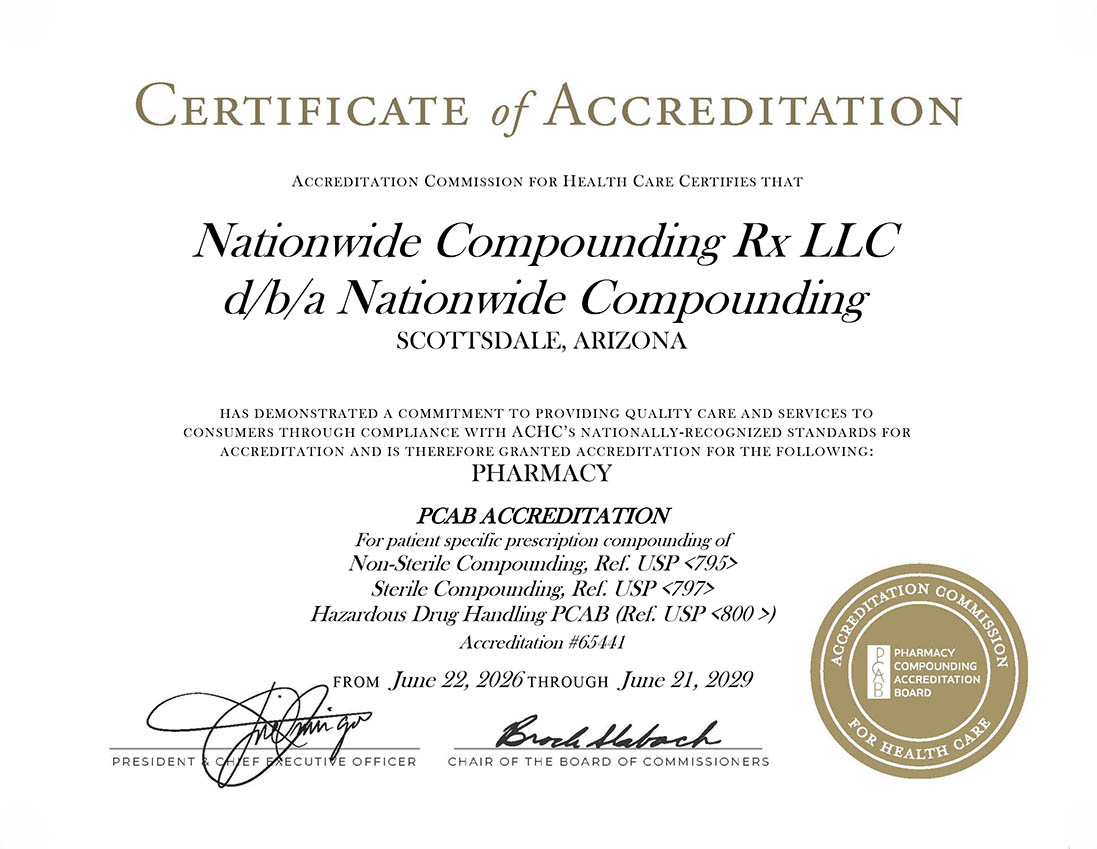
Nationwide Compounding Rx®, a PCAB-accredited compounding pharmacy based in Scottsdale, Arizona, uses a two-portal system: a Provider Portal and a Patient Portal. It serves as a useful contrast, not a direct replacement for specialty dispensing.
Side-by-Side: CVS Specialty Sign-In vs. Nationwide Compounding Rx Patient Portal
| Factor | CVS Specialty | Nationwide Compounding Rx® |
|---|---|---|
| Account creation | Requires an insurer-initiated specialty transition before registration | Patient access is tied directly to a submitted prescription through a secure portal, without a multi-system credential maze |
| Number of login systems | Patients split across Specialty, Caremark, and CVS.com | One Patient Portal and one Provider Portal, each with a single clear purpose |
| Support structure | Technical, refill, and billing issues routed to three different numbers | Responses within one business day via contact form or portal; direct phone support at (480) 499-8379, Monday to Friday, 7:00 AM to 3:30 PM |
| Turnaround | Standard specialty biologics | 1 to 2 business day turnaround, with same-day pickup for certain custom formulations |
| Accreditation | Typically URAC, ACHC, or Joint Commission for commercial drug dispensing | PCAB Accredited and USP 800 Compliant for compounded preparations |
Both accreditation frameworks are legitimate. They simply apply to different types of pharmacy work.
What CVS Specialty Can’t Fill Anyway
By design, CVS Specialty dispenses commercially manufactured, FDA-approved specialty drugs. It does not create customized formulations. Compounding becomes necessary, regardless of any login issue, in scenarios such as:
- Discontinued or unavailable strengths that need to be recreated
- Allergen-free requirements, including formulations free of dyes, fillers, and preservatives
- Pediatric dosing based on age and weight
- Difficulty swallowing pills, addressed with liquids, troches, or topicals
- Bioidentical hormone therapy adjusted at each refill based on lab results
- Flavor customization, from cherry and bubblegum to piña colada
This is a structural reason some patients need a different pharmacy relationship entirely, independent of service quality or login friction.
Is Switching (or Supplementing) Worth Considering?
A balanced view matters here. Most CVS Specialty patients on standard commercial specialty drugs will still need CVS Specialty, since compounding pharmacies do not replace that function.
Nationwide Compounding Rx® is relevant for a specific group: patients who need custom dosage forms, allergen-free formulations, pediatric-friendly flavors, BHRT adjusted by lab results, or pain-management topicals designed to reduce systemic side effects.
Providers and clinics managing both specialty and compounded prescriptions may benefit from maintaining accounts with both types of pharmacy and using each for its intended purpose.
Availability also depends on location. Nationwide Compounding Rx® ships nationwide using a three-tier state system: fully licensed states, non-sterile only states (with sterile licensing pending), and pending or unlicensed states. Service varies by medication type, state regulations, and prescription requirements.
Conclusion: Fixing the Login Is Step One, Not the Whole Fix
Most CVS Specialty login problems trace back to a few root causes: three separate CVS credential systems, a strict 12 to 25 character password policy with a mandatory 90-day reset, and a sign-in hub that branches into patient, Coram/MyChart, and provider paths without much explanation.
That friction is a symptom of a larger digital-experience gap reflected in J.D. Power and Trustpilot data, not an isolated glitch. For standard specialty biologics, resolving the CVS login through the correct portal and password rules remains the necessary path. For custom, non-commercial formulations, however, a streamlined compounding pharmacy portal offers a genuinely simpler point of entry worth exploring.
Need a Custom Formulation CVS Specialty Can’t Provide? Connect with Nationwide Compounding Rx
Providers can use the Provider Portal to submit and manage prescriptions, track orders, and work directly with the pharmacy team through the Connect → Collaborate → Create → Care framework.
Patients can use the Patient Portal to access account information and manage refill and support requests directly, without multi-system credential confusion.
Contact Nationwide Compounding Rx®:
- Phone: (480) 499-8379
- Fax: 480-699-5341
- Online: Website contact form, with email responses within one business day
- Hours: Monday to Friday, 7:00 AM to 3:30 PM
- Address: 14000 N. Hayden Rd., Suite 104, Scottsdale, AZ 85260
With PCAB accreditation, USP 800 compliance, independent third-party testing, and nationwide shipping (state-dependent), Nationwide Compounding Rx® offers patients and providers a clear, direct path to personalized medication. Reach out today to discuss a custom formulation.
Related Posts

Partell Specialty Pharmacy officially became National Health Rx in late 2025 after Nevada regulators flagged it as a 'distressed' pharmacy requiring monthly inspections. This 2026 guide breaks down the name change, Partell's FDA warning-letter history, and what current patients need to know before filling their next prescription.

Thinking about bioidentical hormone replacement therapy in Virginia? This 2026 guide breaks down the state's Nonresident Pharmacy Registration law, what recent FDA labeling changes mean for patients, and how to verify a compounding pharmacy is legally authorized to ship to your address. Learn the three essentials—legal authority, quality credentials, and clinical fit—before choosing a BHRT provider.

Houston's compounding pharmacy market is booming, but 2026 recalls and a decade of FDA warning letters have exposed a critical credential gap. Discover why PCAB accreditation matters more than size or reputation, and get a practical framework for vetting any compounding pharmacy in Houston TX.

Patients searching for a compounding pharmacy in Asheville need clarity on GLP-1 rules in 2026. This guide breaks down North Carolina's regulations on compounded semaglutide and tirzepatide, plus how to verify a legitimate pharmacy before filling a prescription.